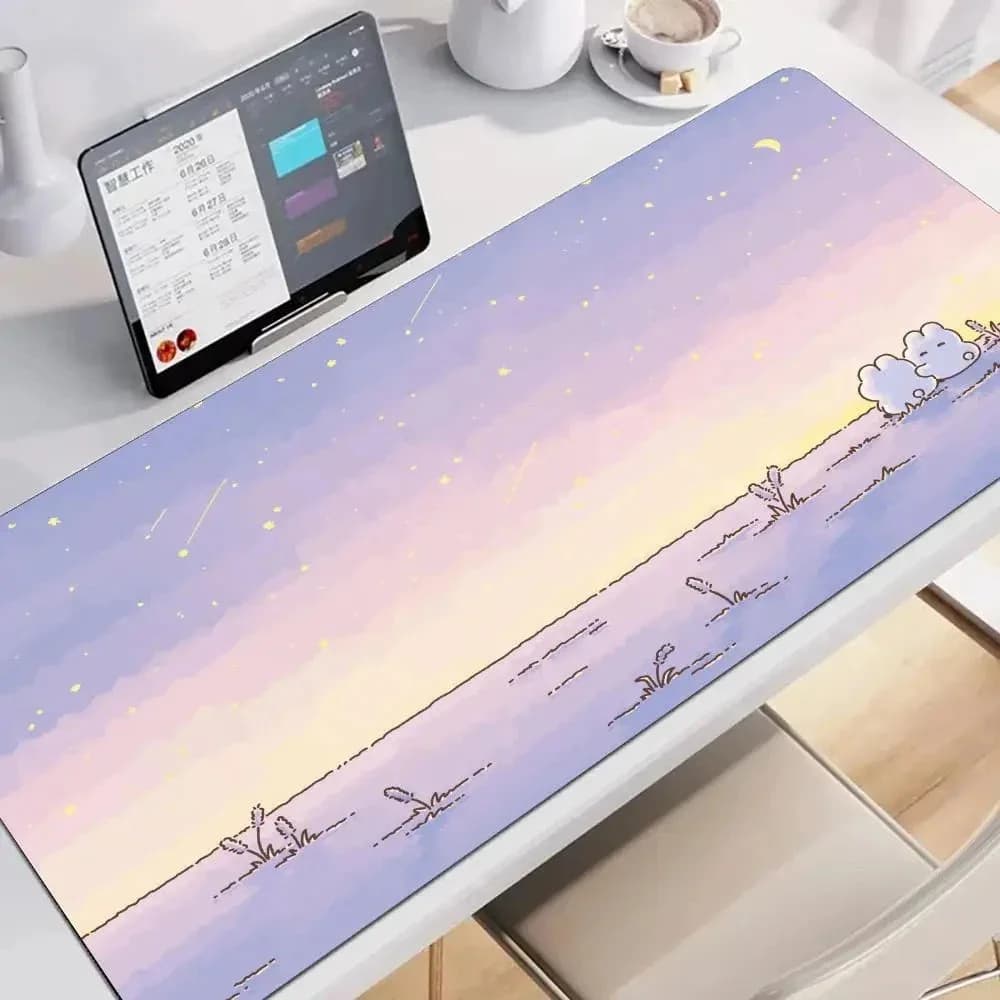
White Bunny Adventure Mouse Pad
From $24.00

Kawaii Vibe · Your own kind of cute.
Kawaii
Give your computer setup or study nook a calm visual foundation with our Kawaii Mouse Pads. Featuring gentle illustrated storybook landscapes and extended footprints, these desk mats provide dedicated room for your mechanical keyboard, mouse, and stationery items. Browse sizes ranging from 60x30cm up to 100x50cm, and receive Free standard shipping on every order.


Setting up a balanced workstation begins with your desk surface measurements rather than artwork choices alone. Measure your usable desktop clearance from front edge to back wall before buying. An oversized mat that hangs over the front bevel will curl and fray, while an undersized piece leaves your peripherals cramped during daily use.
For shallow writing tables or compact laptop nooks, options like 60x30cm or 70x30cm allow sufficient glide room for an optical mouse alongside a sixty-percent keyboard. They fit small laptop stands cleanly without overlapping notebook corners, pencil holders, or external hardware.
Wider workstations supporting full-size mechanical keyboards, dedicated number pads, and audio hardware require larger dimensions such as 80x40cm, 90x40cm, or massive 100x50cm footprints. These extended formats seat your accessories securely without uneven table steps, giving broad wrist clearance.
Take a physical tape measure to your setup before finalizing your choice. Because exact thickness and edge tolerances are not universally charted across every listing, measure your desk space carefully before ordering to confirm your table clearance matches the item specifications.
Matching your desk surface to existing peripherals establishes a deliberate aesthetic across your room. Look at your dominant chassis tone: clean white monitors, brushed metallic laptop shells, and cream desktop cases act as neutral baselines for soft storybook artwork.
Colorways like the White Bunny Adventure Mouse Pad provide clear thematic directions through specific color variants. The Sunrise option introduces warm daytime hues that pair well with buttercup yellow accents, cream keycaps, and warm timber desk risers.
If you use cool lighting or sage green accessories, the Field variant offers outdoor greenery tones that frame your monitor cleanly. It looks natural beside small potted succulents and pastel stationery holders arranged along your desk perimeter.
For twilight gaming sessions or dim evening study, the Bedroom variant features gentle, muted pastels. Pair it with soft ambient monitor backlights and complementary tech covers like Kawaii Airpod Cases resting beside your keyboard tray.
Animal illustrations anchor the whimsical character of your setup, turning a plain computer table into an inviting personal corner. Whimsical scenes depicting animal adventures create soft visual breaks across expansive desk mats during intense working or studying hours.
Bunny illustrations fit neatly into soft pastel aesthetics. You can expand that visual theme beyond your keyboard area by browsing our Kawaii Bunny collection to locate matching figurines, desk organizers, or desktop plush figures that share that playful energy.
If your personal taste leans toward domestic pets and cozy indoor motifs, incorporate items from our Kawaii Cat selection on peripheral shelving. Balancing one central animal motif across your desk prevents graphic clutter while keeping your workspace distinct.
Keep desk figurines along the upper boundary of your mat so your mouse hand maintains an unobstructed travel radius during daily tasks. A neat arrangement ensures decorative elements remain tidy and functional throughout long typing sessions.
A desktop mat should visually connect with the textiles and furnishings in your immediate study area. When your desk shares space with your sleeping quarters, bridging decor across both zones makes the entire room feel thoughtfully arranged.
Select desk illustrations that reflect the bedding and throws visible behind your workstation chair. Choosing tones that coordinate with options from our Kawaii Blankets line creates a pleasant rhythm between your study desk and nearby reading nooks.
If your workspace sits directly beside your bed frame, match your mat's primary background shade with textiles from our Kawaii Bedding selection. A soft cream or gentle pastel mat echoes light duvets, softening harsh monitor hardware.
Consider how overhead lighting interacts with these pastel tones during daytime and nighttime hours. Diffuse warm lamps prevent glaring highlights across extended desk surfaces while keeping the illustrated animal prints easy on your eyes.
A wide desk pad acts as an organizer border, defining zones for stationery, speakers, and small decorative pieces. Choosing a 70x40cm or 80x40cm dimension leaves clear side margins where you can position desktop figures and organizers safely off your mouse trajectory.
Inspect the surrounding wall space and table corners to see what decorative items currently populate your workspace. Arranging pieces from our Kawaii Decorations collection along the outer edge frames your illustrated mouse mat without eating into usable trackpad space.
Place tall items, such as pencil pots, monitor risers, and upright calendars, toward the top corners of your extended pad. This layout frames the artwork in the middle, keeping scenic narrative illustrations clear and visible under your hands.
Avoid crowding decorative pins, paperweights, or small trinkets inside your active mouse zone. Always leave at least twenty centimeters of unobstructed mat space to your mouse hand side to maintain smooth cursor travel during daily gaming and typing.
Your desk setup represents an extension of your everyday personal style. Carrying visual themes from your work area into your daily travel items creates a pleasant routine whether you study at home or work remotely in libraries.
The gentle pastels and playful characters on our mats match well with functional pieces from our Kawaii Accessories catalog. Keeping small essentials in pastel pouches makes unpacking your gear at any workstation straightforward and visually consistent.
When packing up a mobile setup, protect your electronics by carrying them in specialized totes or carriers from our Kawaii Bags range. You can match the color profile of your home desk pad to your daily transport carryall.
Selecting consistent color directions across both stationary gear and travel pieces helps build a distinct personal style. Review your most-used accessories before choosing mat variants like Sunrise or Field to maintain that chromatic harmony.
Creative professionals and gamers often run setups with graphic tablets, external audio DACs, macro pads, and broad dual monitors. Compact mats fail in these configurations because peripheral feet sit awkwardly half-on and half-off the mat edge.
For multi-device tables, wide formats like the 90x40cm or 100x50cm options found on the White Bunny Adventure Mouse Pad provide smooth coverage across the entire central work zone. Both keyboard and drawing stylus rest on one continuous surface plane.
This expansive surface eliminates uneven typing vibrations and keeps tablet stands stable during long sketching sessions. Additionally, you protect the wood veneer or laminate finish of wide standing desks from constant equipment repositioning throughout the working day.
Before selecting a 100x50cm mat, check the depth of your desk frame. Monitor arms with clamping mechanisms require a few centimeters of rear clearance so the mat edge lies flat without being pinched underneath heavy hardware mounts.
Finalizing your desk mat purchase requires balancing layout requirements, budget tiers, and delivery terms. Review your peripheral layout one last time: ensure your mouse pad choice accounts for keyboard width, mouse travel area, and your desktop audio footprint.
Standard shipping is free on every order. Priority shipping is available at checkout.
Always double-check desk dimensions directly against the size variants provided on the product page. When specific listings do not feature measurement tables, reach out to customer support to confirm edge cuts and ensure the sizing fits your furniture layout.
Once your mat arrives, lay it out completely flat on your cleaned desk surface before setting your keyboard down. Setting up your monitors, cable routing, and peripherals across a fresh mat establishes an organized, calm work environment right away.
Extended desk pads naturally collect everyday dust, pencil graphite, and skin oils over extended working hours. Establishing a gentle maintenance routine keeps scenic storybook prints bright without degrading the underlying fabric or print clarity.
For routine weekday cleaning, use a dry microfiber cloth or a soft clothing brush to sweep away loose crumb particles and lint. Avoid using harsh chemical cleaners, alcohol sprays, or abrasive scouring pads, as aggressive chemicals can cause colors to fade prematurely.
If you encounter a light drink spill, immediately blot the liquid using a clean, dry paper towel rather than rubbing it across the illustration. Rubbing pushes moisture deep into the fiber matrix and risks spreading light tea or coffee stains across pastel backgrounds.
For spot cleaning deeper marks, use a damp cloth lightly moistened with lukewarm water and a drop of gentle soap. Dab the area softly, wipe away soapy residue with a fresh damp towel, and allow the mat to air-dry flat completely before replacing your mechanical keyboard.